Windows 11 Tests Per-App Camera, Mic, and Location Permissions
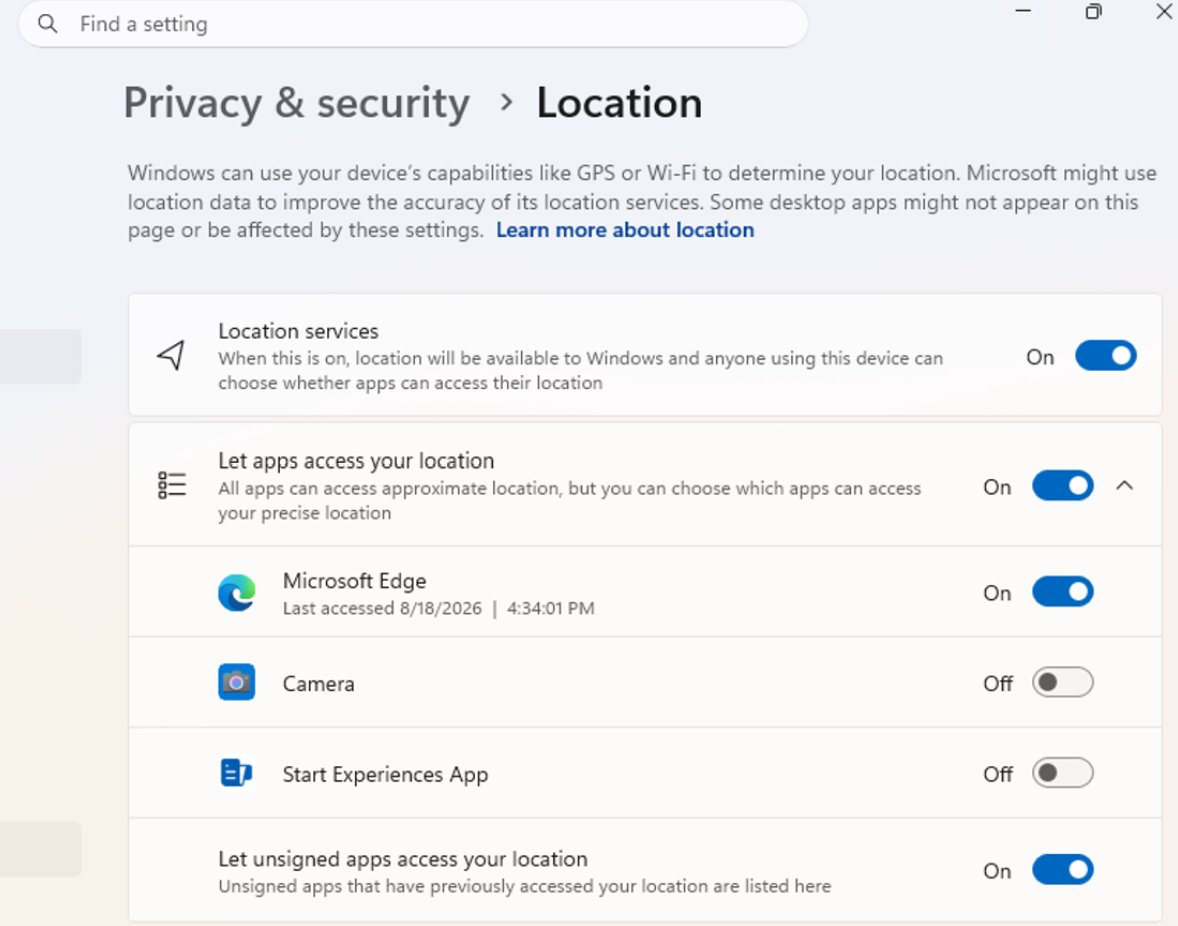
Windows 11 is preparing to abandon its all-or-nothing approach to how ordinary desktop applications access the camera, microphone, and location data. Microsoft has begun testing individual, per-app permissions, allowing users to deny access to a single application without disabling that capability system-wide for everything else.
New Granular Controls in Build 26340.9233
These new settings appear in the experimental Windows 11 Insider Preview build 26340.9233, which Microsoft released on August 21. According to Microsoft’s release notes, traditional desktop applications have historically been governed by a single, system-wide toggle. Windows now allows users to individually grant or deny each application’s access to the camera, microphone, and location data.
Where to Find the New Settings
Camera, microphone, and location settings have been relocated into Settings, under Privacy & Security, where a dedicated list of applications will now appear for each of these resources. If an application has never previously accessed a given resource, Windows will prompt for permission the first time it attempts to do so. Decisions already made will not be reset: applications that currently have access will retain it, while previously blocked applications will remain without the corresponding permissions.
A Caveat: App Names May Not Always Be Accurate
Microsoft cautions that Windows won’t always be able to display an application’s familiar, expected name. Applications that rely on shared system components or launch content through browser-based mechanisms sometimes appear under a different name entirely. If the system cannot verify publisher information, an “Unsigned” label may appear next to the application. Microsoft advises granting sensitive permissions only to familiar, trusted applications, and urges particular caution when it comes to camera and microphone access.
AutoPlay Gets a Visual Overhaul
The same build brings a redesign of AutoPlay – the dialog that appears when connecting a phone, camera, or removable storage device. The interface has been rebuilt on WinUI, gaining dark mode support along with improved handling of text scaling and display settings. AutoPlay notifications are now pinned within the Notification Center, allowing users to return to them later if needed.
Additional Changes in This Build
Windows 11 also gained a new setting that automatically maximizes applications to full screen upon launch. Microsoft added this feature primarily to benefit users of screen readers, magnification tools, and tablet mode, though anyone can enable persistent window maximization if they prefer.
File Explorer received a modest update as well: PDFs and other non-HTML files downloaded from the internet can now automatically display within the preview pane. The Microsoft Store has also gained the ability to process in-app purchases within packaged WinUI 3 applications that require elevated privileges to function.
Bug Fixes and Rollout Details
Beyond these new features, Microsoft resolved issues that previously caused the taskbar animation to freeze, the mouse cursor to disappear within certain applications, and the Flags section of Windows Insider settings to remain empty. The company has also begun displaying the version number of packaged applications directly within the main list of installed programs.
Microsoft is rolling out these features gradually through its Controlled Feature Rollout (CFR) mechanism, meaning some Windows Insider Program participants may not yet see the new settings. The company separately cautions that features within the experimental channel remain subject to change, may be removed entirely, or might never reach the general public release of Windows 11 at all.
Support Our Threat Intelligence
If you find our technology report and cybersecurity news helpful, consider supporting our work.
 Buy Me a Coffee
PayPal
Buy Me a Coffee
PayPal


