Raspberry Pi Desktop Returns for PC and Mac
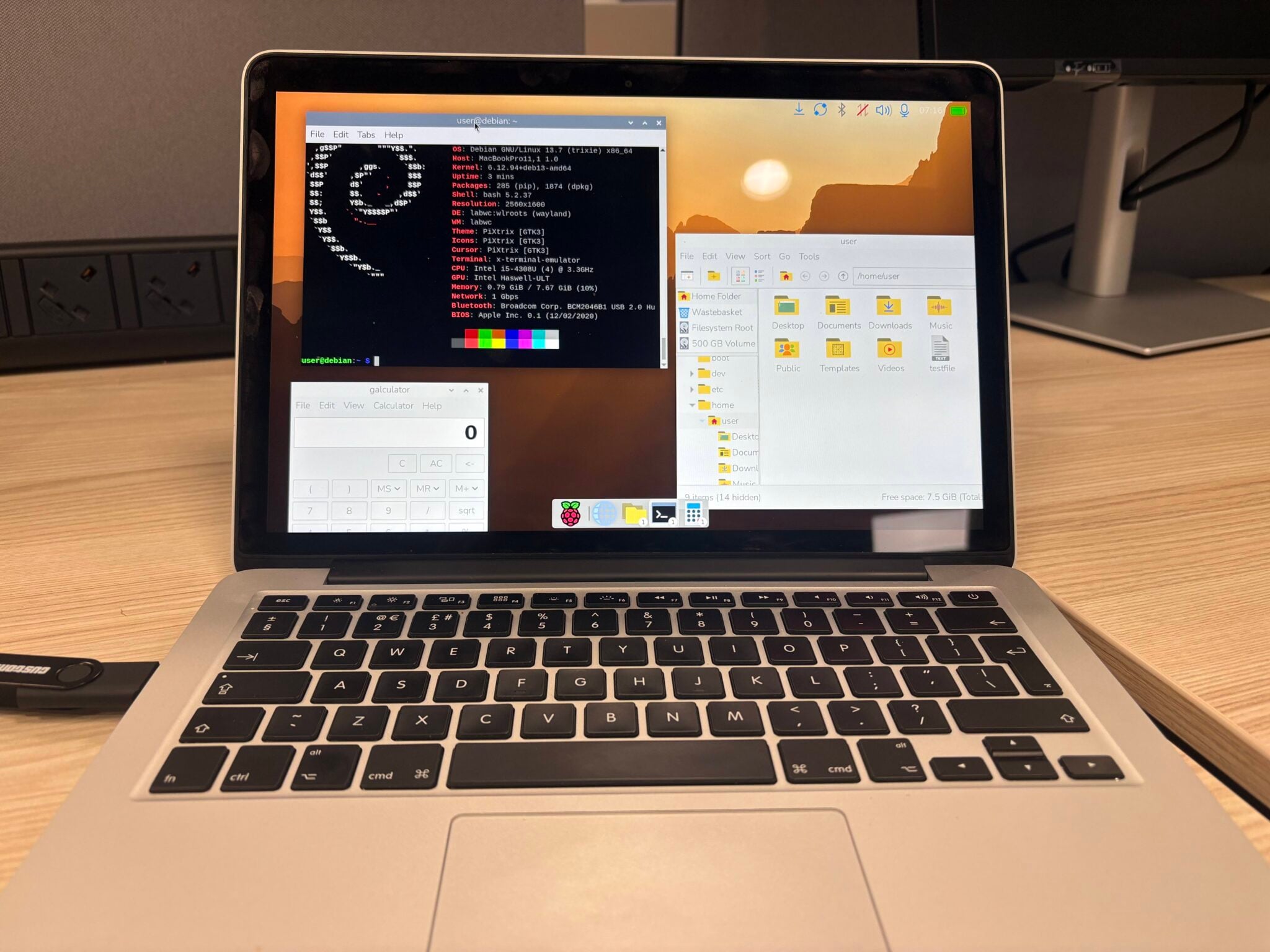
After an agonizing four-year hiatus, the Raspberry Pi Foundation has triumphantly resurrected a contemporary iteration of the Raspberry Pi Desktop. This operating system is specifically engineered for conventional personal computers and legacy Intel-based Macintosh systems. Bypassing Debian 12 entirely, this revitalized release courageously leaps directly to the cutting-edge Debian 13 Trixie. However, existing users face a significant paradigm shift; the transition from a 32-bit to a robust 64-bit architecture mandates a completely fresh, comprehensive installation.
Bridging the Hardware Divide
The Raspberry Pi Desktop elegantly transposes the familiar, intuitive environment of the Raspberry Pi OS onto standard computers, completely circumventing the necessity for dedicated single-board hardware. The initiative originated in 2016 as a modest, experimental Debian derivative. By 2017, the developers had successfully forged the inaugural version capable of a fully fledged installation upon standalone PCs or Macs.
The preceding major revision for traditional computing architectures debuted in 2022, anchored by Debian 11 Bullseye. Following the subsequent release of Debian 12, a dedicated PC compilation conspicuously failed to materialize, even as the primary Raspberry Pi OS relentlessly advanced. The foundation candidly attributed this prolonged pause to severe resource constraints. Fundamentally, the enterprise generates its revenue through hardware sales while benevolently distributing software without charge. Consequently, the engineering division was compelled to prioritize other critical developmental trajectories. Despite this stagnation, the development team continually received impassioned inquiries demanding a refreshed release.
The Leap to 64-Bit Architecture
The contemporary Raspberry Pi Desktop is profoundly rooted in Debian 13 Trixie and, for the very first time, is distributed exclusively for the 64-bit amd64 architecture. The vast majority of personal computers manufactured within the preceding fifteen years comfortably satisfy these newly minted requirements, as do the venerable Intel-based Macintosh machines.
This decisive migration to a 64-bit foundation permanently closes the door on conventional upgrade paths from antiquated Raspberry Pi Desktop installations. Prominent developer Simon Long explicitly confirmed that all antecedent versions operated on 32-bit architecture. Therefore, transitioning to this revitalized ecosystem absolutely requires initiating a pristine, from-scratch installation.
Conversely, modern Macintosh computers powered by bespoke Apple Silicon remain unfortunately unsupported. The overarching Debian project continues to classify Apple processor compatibility as strictly experimental. Consequently, the Raspberry Pi team harbors zero intentions of launching a dedicated ARM iteration for Mac until the fundamental platform support status definitively evolves.
Modern Features and Remote Capabilities
This newly minted Raspberry Pi Desktop proudly incorporates the sophisticated Raspberry Pi OS Trixie environment. It features a modernized desktop fueled by Wayland, a completely overhauled Control Centre, and a comprehensively updated application dashboard. Furthermore, the developers seamlessly integrated Raspberry Pi Connect, an invaluable tool permitting remote administration of the PC or Intel Mac via intuitive screen sharing or a direct terminal interface.
During the configuration of Raspberry Pi Connect, the user thoughtfully assigns a distinct nomenclature to the computer. Subsequently, the machine seamlessly populates the unified device roster alongside traditional Raspberry Pi single-board computers. The single-board devices themselves cleverly eschew this naming requirement, as the underlying service ingeniously leverages their unique hardware identifiers.
The Raspberry Pi Desktop is officially distributed as a highly versatile, bootable ISO image. Enthusiasts can effortlessly write the operating system onto a USB flash drive and execute it without necessitating a permanent installation. Notably, the persistent mode allows users to seamlessly save modifications directly back to the USB media. For those desiring a permanent deployment upon a hard drive or solid-state drive, the intuitive Calamares installer is readily available.
The official system image consumes approximately 2.6 gigabytes, harnesses the formidable Linux 6.12 kernel, and proudly bears a compilation date of October 5, 2026. The developers vehemently intend to sustain ongoing support for this computer-centric version. However, they prudently decline to guarantee a rigid, predictable release schedule. Simon Long astutely clarified that future developmental velocity will intrinsically depend upon the system’s burgeoning popularity and the tangible volume of active users.
Support Our Threat Intelligence
If you find our technology report and cybersecurity news helpful, consider supporting our work.
 Buy Me a Coffee
PayPal
Buy Me a Coffee
PayPal


