Fake MP4 Files Conceal Malware
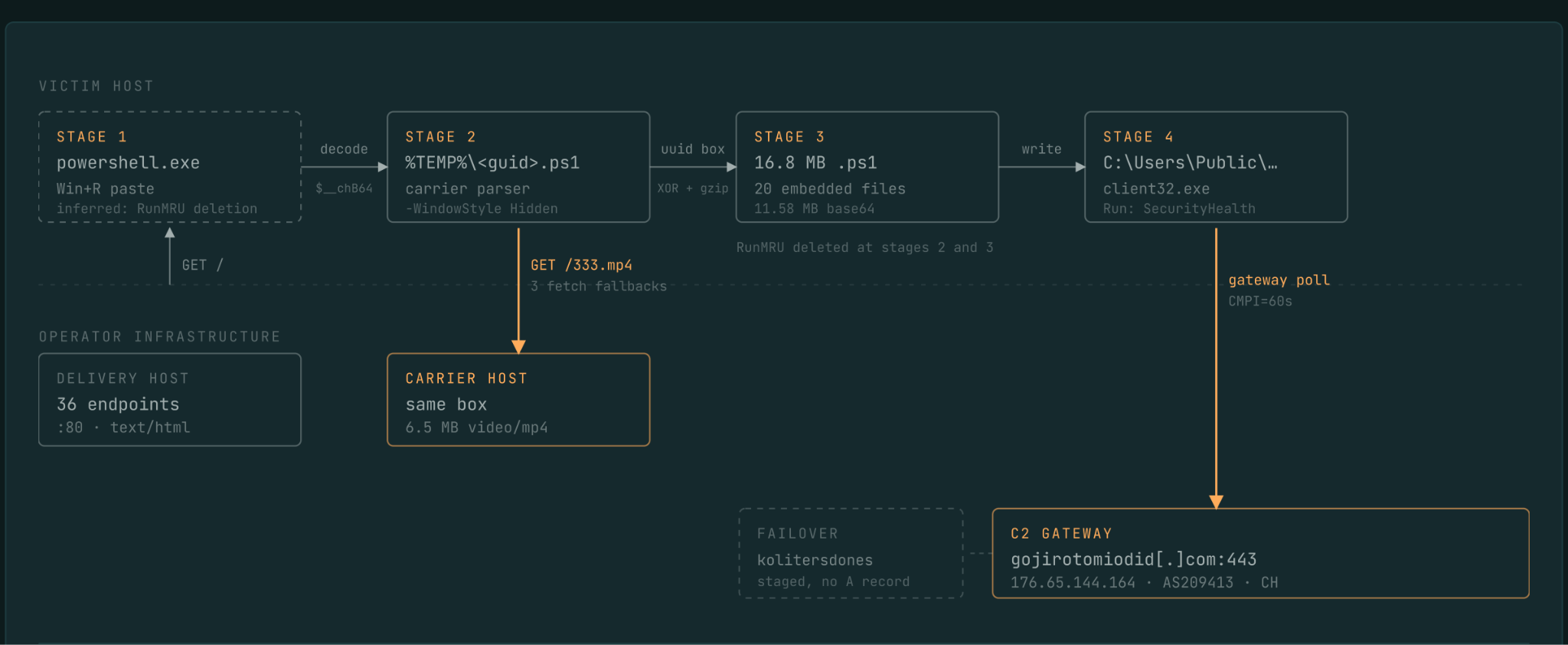
Sometimes, threat actors utilize video files not for mere viewing, but for cunning concealment. Censys specialists recently discovered a sophisticated malware campaign. This campaign actively deploys structurally sound, yet entirely unplayable MP4 files. These files stealthily deliver the NetSupport Manager application. Consequently, following a covert installation, this legitimate remote administration tool grants attackers persistent, unauthorized control over the compromised computer.
The ClickFix Infection Vector
Censys investigators failed to locate the original malicious lure. Therefore, they currently hypothesize the attack initiates with a fraudulent CAPTCHA prompt. The subsequent clearing of the command history within the Windows “Run” dialog strongly suggests a ClickFix technique. This deceptive method convinces the victim to manually paste and execute a copied command. Subsequently, PowerShell downloads the initial component of the complex infection chain.
Evading Superficial Network Inspections
The primary script initially checks the computer name, hunting for signatures of an analysis environment. It subsequently hides the PowerShell window and generates a secondary script within the `%TEMP%` directory. This secondary script then contacts a remote server, masquerading with a Chrome browser identifier. It ultimately downloads a 6.5 MB file. Crucially, this request perfectly mimics a standard media download. This clever disguise successfully conceals the transmission of malicious content from superficial network security inspections.
The Anatomy of the Malicious Container
The interior of the MP4 file contains virtually no actual video data. Instead, an enclosed `uuid` block occupies 99.95% of the file structure. This massive block securely stores an XOR key alongside a heavily compressed PowerShell script. Upon extraction, this script expands massively to nearly 17 MB. The container successfully passes rudimentary file type verification checks. However, it possesses zero resolution and entirely lacks essential decoding parameters. Consequently, standard media players simply cannot open it.
Establishing Persistent Remote Control
The final script strategically places the NetSupport Manager client within a randomized subdirectory of `C:/Users/Public`. It deliberately disables all visible program elements to maintain stealth. Furthermore, it establishes persistence by registering an auto-start entry cleverly named `SecurityHealth`. This deceptive name mimics a legitimate Windows Defender component. Finally, the client establishes communication with a command gateway utilizing port 443. Censys identified 18 distinct builds operating across 40 active nodes, distributed throughout six networks and four countries.
Defending Against ClickFix Attacks
Simply opening this specific MP4 file within a media player does not infect the computer. The infection chain requires the execution of the previously copied command. To ensure protection, users must never paste commands originating from suspicious websites directly into the “Run” dialog, PowerShell, or the command terminal. Censys strongly advises security systems to flag MP4 files that fail to decode properly or consist almost entirely of `uuid` blocks. Furthermore, system administrators should proactively verify the published Indicators of Compromise (IoCs).
Support Our Threat Intelligence
If you find our technology report and cybersecurity news helpful, consider supporting our work.
 Buy Me a Coffee
PayPal
Buy Me a Coffee
PayPal


