TerminalFix: Fake CAPTCHA Opens a Reverse Tunnel Into Networks
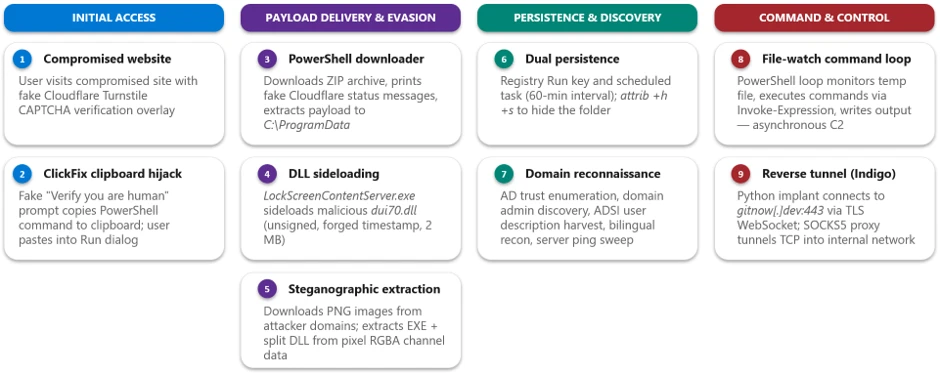
A familiar humanity check has suddenly become a gateway into the corporate network. Microsoft has disclosed a campaign named TerminalFix, in which compromised websites display a counterfeit Cloudflare Turnstile CAPTCHA and coax the visitor into running a malicious command in Windows Terminal or PowerShell.
An Evolution of ClickFix
TerminalFix builds upon the widely known ClickFix technique. After a visitor clicks the bogus verification, the site quietly copies a command to the clipboard and asks the user to paste it into the console. The script then downloads a ZIP archive, launches an installation, and prints colourful messages announcing a successful Cloudflare check, so as to allay suspicion.
DLL Sideloading and Steganography
The archive contains a signed file, LockScreenContentServer.exe, and a malicious library, dui70.dll. The legitimate program loads the DLL from its own folder rather than the system directory. This sideloading allows code to execute within a trusted process. The subsequent components lie concealed in the pixels of three PNG images and are assembled only on the infected computer.
Persistence and Reconnaissance
The malware entrenches itself through a registry autorun key and a task that fires every hour. TerminalFix then gathers system information, searches for users and domain administrators in Active Directory, checks trust relationships, and polls servers. In this way, the operators identify domain controllers, databases, backup stores, gateways, and mail systems.
A Python Backdoor Turns the Host Into a Proxy
The central component is a Python-based backdoor, client.py. It establishes an encrypted WebSocket tunnel to the command server over port 443 and turns the infected computer into a network proxy. Consequently, the operators can direct arbitrary TCP traffic to any host reachable from the local network, while a separate PowerShell loop enables remote command execution and the retrieval of results.
Microsoft’s Recommendations
Microsoft advises restricting PowerShell for ordinary users through AppLocker, Application Control for Windows, or group policies, enabling script-block logging, and monitoring for DLL sideloading. The launch of LockScreenContentServer.exe outside system directories warrants particular attention. Above all, employees must never paste commands offered by websites bearing a CAPTCHA.
Support Our Threat Intelligence
If you find our technology report and cybersecurity news helpful, consider supporting our work.
 Buy Me a Coffee
PayPal
Buy Me a Coffee
PayPal


