Teams Phishing Targets Enterprise Access
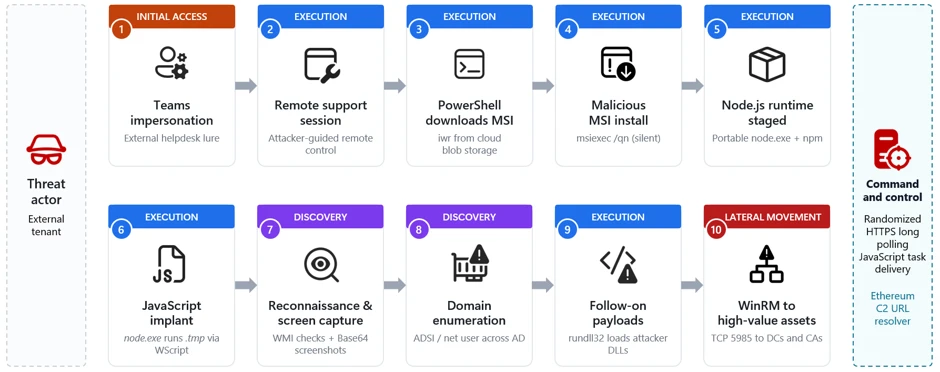
An unexpected request originating from corporate technical support frequently appears entirely innocuous. This perception persists until an employee unwittingly surrenders computer control directly to an unknown individual. Microsoft recently exposed a highly active campaign exploiting this vulnerability. Cybercriminals aggressively contact victims via Microsoft Teams, convincingly impersonating legitimate IT personnel. Subsequently, they weaponize a single remote session, transforming it into a direct pathway toward compromising crucial organizational systems.
Social Engineering and Remote Exploitation
The attackers initiate contact through messaging or voice calls utilizing external accounts. They skillfully persuade the targeted employee to accept an active screen-sharing request. Alternatively, they manipulate the victim into opening Quick Assist and providing the essential connection code. Occasionally, the attackers integrate sophisticated voice phishing into the correspondence. This tactic ensures dangerous instructions and malicious links remain absent from the permanent chat log. Crucially, this operation does not exploit any technical vulnerability within Teams. The victim actively ignores explicit system warnings regarding communication with an external party.
Deploying the JavaScript Backdoor
Upon securing remote access, the operator immediately launches PowerShell. They download a malicious MSI file from a cloud repository, carefully disguising it as a routine software update. Following this, they covertly execute the installation utilizing the `msiexec` command. This package stealthily downloads an official, portable Node.js environment. Subsequently, it decrypts and executes a sophisticated JavaScript backdoor. The utilization of signed components and standard Windows utilities allows this malicious activity to blend seamlessly with normal system operations.
Lateral Movement and Infrastructure Reconnaissance
The backdoor establishes persistence within the user’s local profile, adopting the deceptive moniker “EdgeUpdate”. It then establishes a secure HTTPS connection with a designated command server to receive JavaScript instructions. The operator systematically gathers comprehensive intelligence regarding the compromised computer, installed security software, and the surrounding virtual environment. They capture screen images regularly and meticulously map Active Directory accounts and servers. Additional malicious Dynamic Link Libraries (DLLs) execute covertly through the standard `rundll32` program.
Exploiting Windows Remote Management
Following this initial reconnaissance phase, the attackers leverage Windows Remote Management (WinRM). They utilize port 5985 to execute lateral movement toward adjacent computers. Microsoft observed these actors actively targeting critical file servers, sensitive databases, domain controllers, and certification authorities. This aggressive activity establishes the necessary foundation for widespread infrastructure compromise, massive data theft, or catastrophic ransomware deployment. However, Microsoft has not officially confirmed a fully completed domain takeover resulting from this specific campaign.
Defensive Strategies and Mitigation
Security experts strongly advise employees to verify any unexpected technical support requests independently. They must utilize established, internal communication channels for this verification process. Administrators should restrict external Teams communications exclusively to trusted domains. Organizations must permit only explicitly approved remote assistance applications. Furthermore, IT departments must restrict WinRM access solely to designated management workstations. Administrators should actively monitor for suspicious network connections and immediately reset any passwords accessible from a compromised device.
Support Our Threat Intelligence
If you find our technology report and cybersecurity news helpful, consider supporting our work.
 Buy Me a Coffee
PayPal
Buy Me a Coffee
PayPal


