Native Integration: Microsoft Launches Coreutils for Windows
Bridging the Operating System Divide
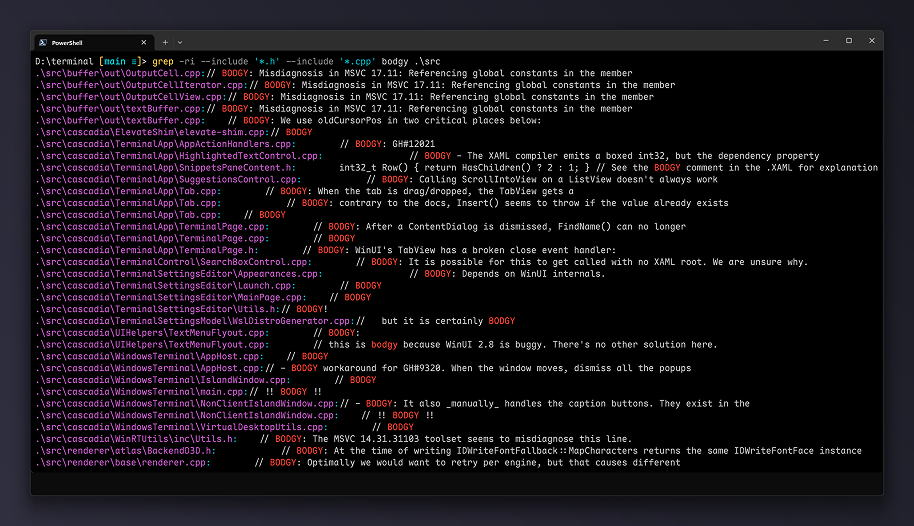
Microsoft recently debuted Coreutils for Windows. This toolkit introduces familiar Linux and macOS utilities natively into the Windows ecosystem. Consequently, these commands function flawlessly without additional translation layers. Software engineers no longer face disruptive cognitive friction when transitioning across platforms. Therefore, tools like cat, grep, find, ls, cp, and rm execute natively within the standard Windows command space. This experience perfectly mirrors operations in Linux, macOS, WSL, or containerized nodes.
Homogeneous Command Workflows
Furthermore, the novel utility suite comprehensively supports traditional command chaining, complex parameters, and automation scripts. The core philosophy remains elegant and straightforward. Specifically, practitioners navigating multi-platform terminal environments should employ identical instrumentation. Thus, operators avoid wasting valuable temporal capital restructuring configurations for system-specific architectures.
Provisioning and Architectural Implementation
Currently, Coreutils for Windows resides in a public preview phase. Administrators can instantly provision the package via the WinGet client by executing winget install Microsoft.Coreutils. Alternatively, teams can acquire the compiled binaries directly from the official repository release page.
Architecturally, the toolkit deploys as a singular, multi-call binary executable. However, each constituent utility exposes itself through standard symlinks or distinct names, such as cat.exe, grep.exe, or find.exe. This sophisticated approach preserves legacy command aesthetics. Additionally, it streamlines enterprise distribution across complex network infrastructures.
Rust-Powered Infrastructure and Component Integration
These modern utilities are written entirely in Rust. They inherit their core behavior from the established uutils/coreutils open-source project. This cross-platform implementation of GNU coreutils already populates contemporary Linux distributions. Microsoft maintains an explicit, Windows-centric fork of this codebase. With this approach, the package bundles foundational core utilities, the findutils suite, and a GNU-compatible variant of grep.
Navigating Namespace Collisions
Crucially, the enterprise meticulously mitigated naming collisions with native Windows and PowerShell environments. In PowerShell 7.4 and higher, commands like cat, cp, and ls often conflict with built-in aliases. To prevent systemic instability, Microsoft explicitly omitted utilities like dir, expand, more, paste, and whoami. Similarly, the kill command is completely absent. This exclusion exists because Windows natively lacks the POSIX signal architecture.
Meanwhile, Microsoft implemented backwards-compatible fallbacks for legacy DOS commands like find and sort. This legacy preservation ensures that classic CMD batch files using traditional /switch syntax function harmoniously alongside UNIX-like utilities. However, developers must explicitly utilize PowerShell 7.4 or newer. Legacy iterations of PowerShell remain entirely unsupported.
Architectural Asymmetries and Environmental Discrepancies
Permissions and Signal Frameworks
Additional subsystem differences deserve careful attention. Windows manages file security via Access Control Lists (ACLs) rather than standard POSIX permissions. Therefore, auditing file authorization matrices can yield erratic results or fail entirely. While reading existing symbolic links requires no elevated privileges, generating new symlinks demands Developer Mode or an administrative terminal. Additionally, POSIX signals like SIGHUP, SIGPIPE, and SIGUSR do not exist within Windows, although standard Ctrl+C handling operates normally.
Microsoft also deliberately excluded a substantial subset of utilities from the upstream repository. This omission list features chmod, chown, chroot, groups, id, mkfifo, mknod, nice, nohup, stty, tty, users, and who. These tools depend heavily on the POSIX security model and adapt poorly to Windows frameworks. Furthermore, commands like dircolors, shred, sync, and uname offer minimal utility to Windows operators. However, engineers retained dd as a potential candidate for future development phases.
Standardized Documentation and Frictionless Integration
Ultimately, every included command robustly supports the universal --help parameter to expose syntax models and operational arguments. Microsoft anticipates that Coreutils for Windows will drastically minimize workflow friction across Windows, Linux, macOS, WSL, and container networks. This seamless integration uniquely benefits developers who routinely transport scripts and operational habits across heterogeneous platforms.
Support Our Threat Intelligence
If you find our technology report and cybersecurity news helpful, consider supporting our work.
 Buy Me a Coffee
PayPal
Buy Me a Coffee
PayPal


