Cryptographic Misalignments: HP Firmware Revisions Trigger BitLocker Recovery Loops
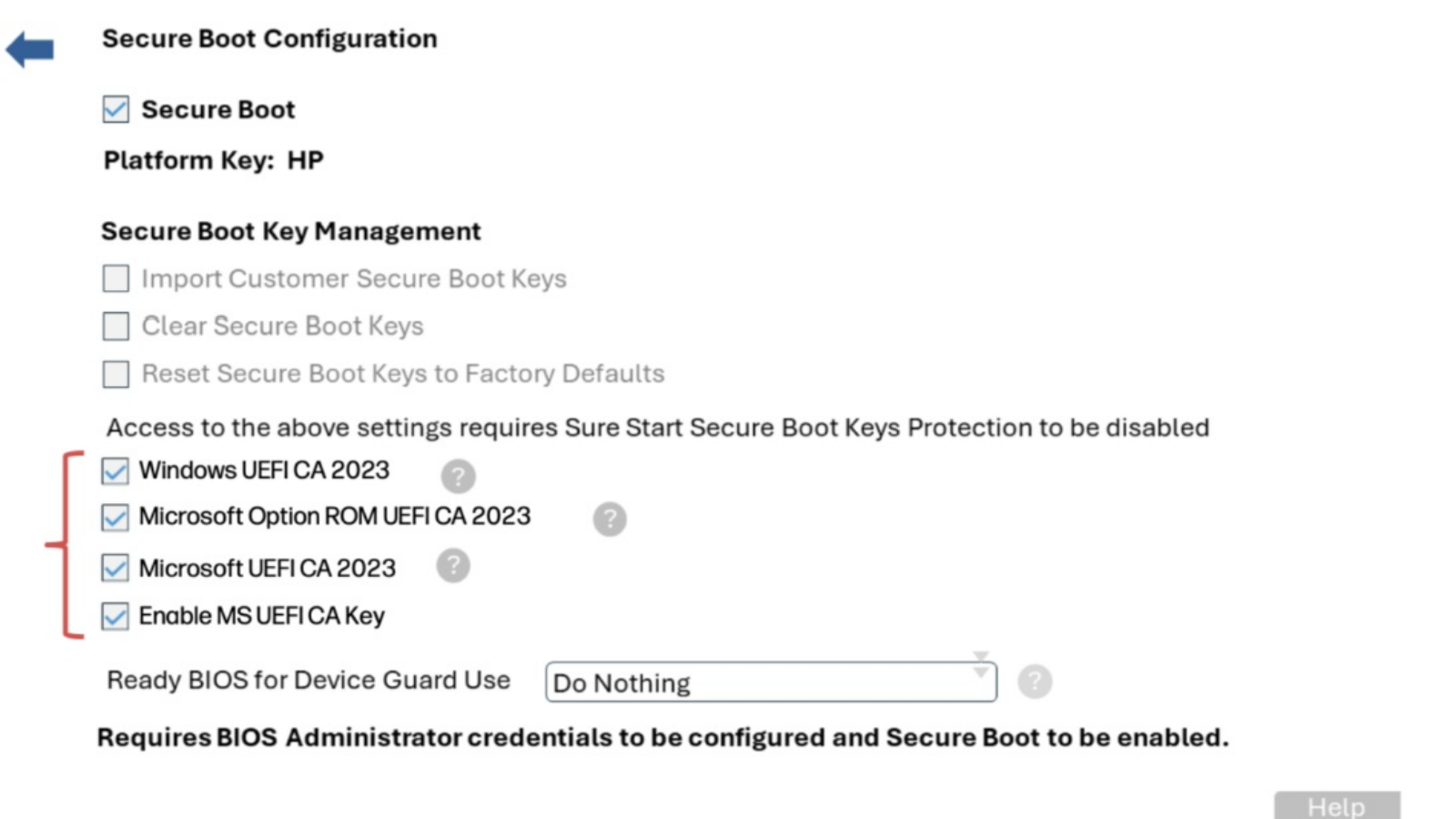
HP’s native BIOS firmware has historically exhibited notable operational instability. Consequently, many users encounter severe system issues after deploying mandatory firmware updates. Recently, numerous operators experienced abrupt boot interruptions or catastrophic black-screen system freezes. Furthermore, other users encountered an unyielding Microsoft BitLocker recovery loop. Consequently, they must supply their decryption keys and execute specific vendor-prescribed remediation protocols to restore operation.
Crucially, this scenario remains entirely distinct from the separate black-screen firmware anomaly reported yesterday. Currently, HP engineers are still investigating these abrupt boot failures and terminal freezes. Regrettably, the manufacturer has yet to distribute an official resolution for those specific symptoms.
The BitLocker Authentication Loop Paradigm
Following the deployment of the early April 2026 HP BIOS revision, systems frequently malfunction upon reboot. Specifically, the machine automatically redirects the initialization sequence to the Microsoft BitLocker lockout interface. Therefore, the user must input the correct recovery key to proceed. However, subsequent system reboots inevitably re-trigger this exact lock screen. This cyclical failure forces users to enter their credentials during every single initialization sequence.
This technical anomaly predominantly plagues HP enterprise notebooks, corporate desktops, and high-performance workstations. Furthermore, the issue specifically impacts users running Windows 11 iterations 23H2, 24H2, and 25H2. Regarding the root cause, the failure stems directly from Microsoft’s newly deployed UEFI CA 2023 digital certificate updates.
Tracking the UEFI CA 2023 Certificate Failure Matrix
When a system enters this perpetual BitLocker recovery state, it typically indicates a registration failure. Specifically, the operating system has failed to apply the modernized UEFI CA 2023 digital certificate to the hardware layer. To verify this cryptographic status, administrators must audit the registry hive. Specifically, they should examine the UEFI CA 2023 Status and UEFI CA 2023 Error key values.
Suppose the UEFI CA 2023 Status registry key remains perpetually stuck in an “in-progress” state. Simultaneously, the corresponding UEFI CA 2023 Error key displays an integer value greater than zero. This telemetry confirms a definitive certificate installation failure. Consequently, enterprise network administrators should consult Microsoft’s official documentation to explore manual deployment alternatives. Fortunately, Microsoft provides a comprehensive manual provisioning playbook. This strategy allows IT professionals to force the certificate installation on non-responsive endpoints.
The Prescribed HP Remediation Protocol
According to HP, executing the following administrative workaround permanently resolves the BitLocker recovery loop. Concurrently, this process successfully forces the application of the underlying UEFI CA 2023 certificate hierarchy. Therefore, IT administrators should implement these steps immediately to ensure the long-term stability of their hardware fleets.
Mandatory Hardware Realignment Steps
- First, shut down the device completely. Subsequently, reboot the machine while repeatedly pressing F10 until the HP logo appears.
- Consequently, the system will open the native HP BIOS console. From here, navigate to Security and select Secure Boot Configuration.
- Within this menu, check all four options associated with the UEFI 2023 schema. Afterward, save your changes and reboot the machine.
- Following this adjustment, the endpoint should initialize normally. Crucially, the machine will bypass the BitLocker lockout screen entirely.
Upon completing the manual intervention, IT administrators can programmatically audit the certificate status. Specifically, they can execute a targeted PowerShell directive to verify the local registry state:
Get-ItemProperty -Path "HKLM:\SYSTEM\CurrentControlSet\Control\SecureBoot\Servicing" -Name "UEFICA2023Status"
Support Our Threat Intelligence
If you find our technology report and cybersecurity news helpful, consider supporting our work.
 Buy Me a Coffee
PayPal
Buy Me a Coffee
PayPal


