Google Password Manager Passkey Bypasses Uncovered
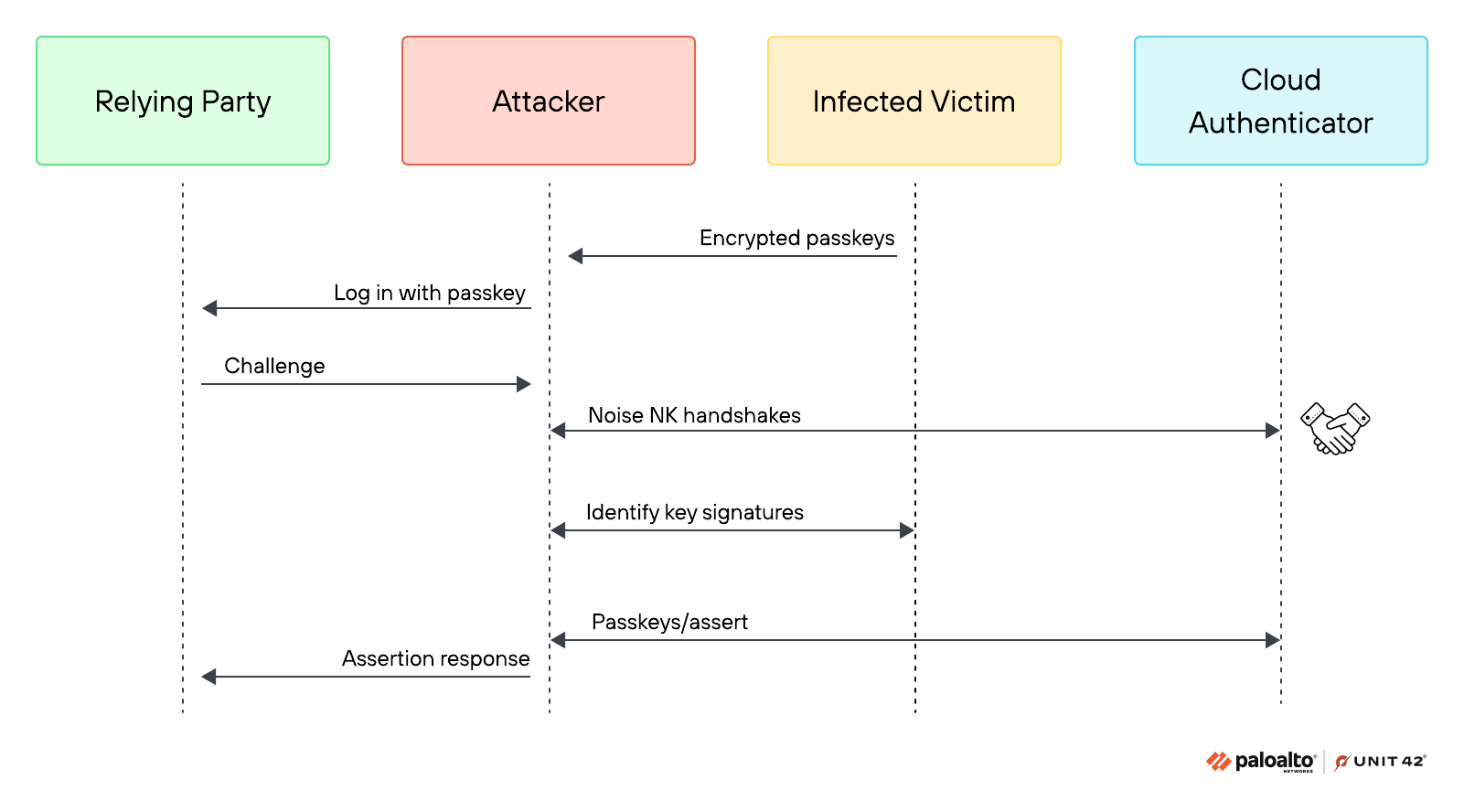
The Transition to Passwordless Security
Passwords are gradually giving way to passkeys as the primary means of digital authentication. Nevertheless, account security remains heavily dependent on how web browsers store and validate associated cryptographic data. Cybersecurity researchers at Unit 42 disclosed three distinct bypass methods capable of exploiting Google Password Manager passkeys on compromised Windows workstations. These techniques allow malicious software to authenticate without requiring a PIN, fingerprint verification, or visible on-screen prompts.
All three attack vectors execute post-exploitation without compromising the underlying cryptography of the passkeys. Once malware infects a system, it accesses local Chrome data, extracts account details, and exploits specific behaviors in device re-registration, key storage, and user presence verification.
Pass-ta-key: TPM Signature Exploitation
The first technique, designated as Pass-ta-key, coerces the built-in Trusted Platform Module into signing an attacker’s request using the device key. Consequently, the authentication service receives a valid login confirmation. However, this response lacks an explicit user presence verification flag.
During security testing, GitHub successfully rejected authentication requests generated via this method. Conversely, eBay initially accepted the forged assertions during trial assessments. However, eBay subsequently updated its verification workflow to remediate the flaw.
Silver Pass-ta-key: Exploiting Re-registration Windows
The second variant, termed Silver Pass-ta-key, targets the transient window during Chrome device re-registration. Before the browser constructs a new user verification key, local malware can register an attacker-controlled key. Requests signed by this malicious key contain the required user presence flags.
According to Unit 42 analysts, this mechanism allows threat actors to maintain persistent remote authentication capabilities from secondary devices following the initial endpoint infection.
Golden Pass-ta-key: Targeting the Security Domain Secret
The third vector, named Golden Pass-ta-key, focuses on the 32-byte Security Domain Secret that protects synchronized passkeys. During Chrome re-registration, this master secret briefly appears unencrypted within system memory. Extracting this secret grants adversaries access to private cryptographic keys, enabling sustained account access directly from an attacker-controlled environment.
Currently, security teams have observed no evidence of active real-world exploitation leveraging these techniques. The Unit 42 report omitted CVE designations, specific vulnerable Chrome version numbers, and complete patch availability statuses. Furthermore, the scope of this research is strictly confined to Google Password Manager within Chrome on Windows devices equipped with TPM hardware, requiring pre-existing endpoint compromise.
Security Recommendations for Web Platforms
Security experts advise web application administrators to mandate strict user verification and rigorously validate presence flags in authentication responses. Additionally, passkey vault providers should verify the provenance of newly registered keys, strengthen re-registration protocols, and prevent master secrets from persisting in system logs or unencrypted memory. The report does not clarify whether resetting the Google Password Manager PIN effectively mitigates compromise following secret extraction.
Support Our Threat Intelligence
If you find our technology report and cybersecurity news helpful, consider supporting our work.
 Buy Me a Coffee
PayPal
Buy Me a Coffee
PayPal


