PANIX: A highly customizable Linux persistence tool
PANIX
PANIX is a highly customizable Linux persistence tool for security research, detection engineering, penetration testing, CTFs and more. It prioritizes functionality over stealth and is easily detectable. PANIX is supported on popular distributions like Debian, Ubuntu, and RHEL, and is highly customizable to fit various OS environments. PANIX will be kept up-to-date with the most common *nix persistence mechanisms observed in the wild.
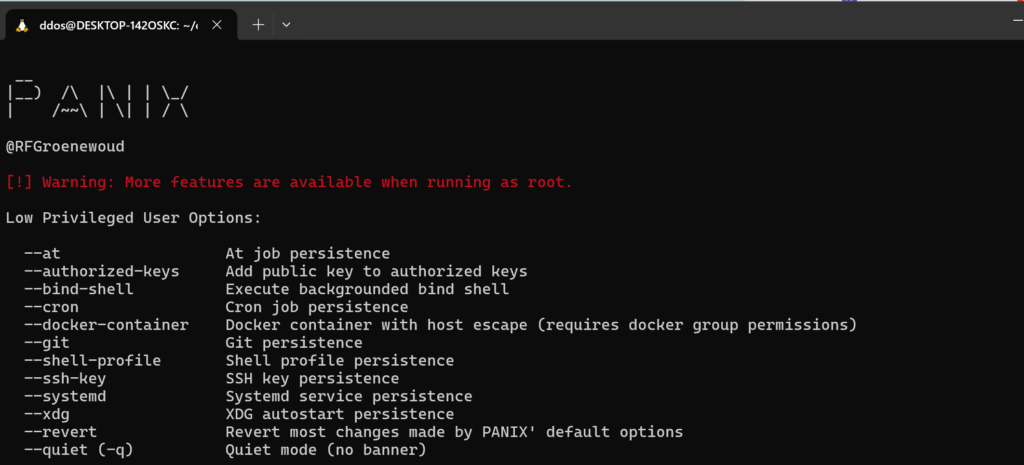
Feature
PANIX provides a versatile suite of features for simulating and researching Linux persistence mechanisms.
| Feature | Description | Root | User |
|---|---|---|---|
| At Job Persistence | At job persistence | ✓ | ✓ |
| Authorized Keys Persistence | Add public key to authorized keys | ✓ | ✓ |
| Backdoor User | Create backdoor user with uid=0 | ✓ | ✗ |
| Bind Shell | Execute backgrounded bind shell | ✓ | ✓ |
| Capabilities Backdoor | Add capabilities for persistence | ✓ | ✗ |
| Cron Job Persistence | Cron job persistence | ✓ | ✓ |
| Create User | Create a new user | ✓ | ✗ |
| Git Persistence | Git hook/pager persistence | ✓ | ✓ |
| Generator Persistence | Systemd generator persistence | ✓ | ✗ |
| Init.d Backdoor | SysV Init (init.d) persistence | ✓ | ✗ |
| Malicious Package Backdoor | DPKG/RPM package persistence | ✓ | ✗ |
| Docker Container Backdoor | Docker container with host escape | ✓ | ✓ |
| MOTD Backdoor | Message Of The Day (MOTD) persistence | ✓ | ✗ |
| Package Manager Persistence | Package Manager persistence (APT/YUM/DNF) | ✓ | ✗ |
| /etc/passwd Modification | Add user to /etc/passwd directly | ✓ | ✗ |
| Password Change | Change user password | ✓ | ✗ |
| RC.local Backdoor | Run Control (rc.local) persistence | ✓ | ✗ |
| Shell Profile Persistence | Shell profile persistence | ✓ | ✓ |
| SSH Key Persistence | SSH key persistence | ✓ | ✓ |
| Sudoers Backdoor | Sudoers persistence | ✓ | ✗ |
| SUID Backdoor | SUID persistence | ✓ | ✗ |
| System Binary Backdoor | System binary wrapping for persistence | ✓ | ✗ |
| Systemd Service Persistence | Systemd service persistence | ✓ | ✓ |
| Udev Persistence | Udev (driver) persistence | ✓ | ✗ |
| XDG Autostart Persistence | XDG autostart persistence | ✓ | ✓ |
Supports
PANIX offers comprehensive support across various Linux distributions.
| Distribution | Support | Tested |
|---|---|---|
| Debian | ✓ | Fully tested on Debian 11 & 12 |
| Ubuntu | ✓ | Fully tested on Ubuntu 22.04 |
| RHEL | ✓ | Fully tested on RHEL 9 (MOTD unavailable) |
| CentOS | ✓ | Fully tested on CentOS Stream 9, 7 (MOTD unavailable) |
| Fedora | ✓ | Not fully tested |
| Arch Linux | ✓ | Not fully tested |
| OpenSUSE | ✓ | Not fully tested |
Dated or custom Linux distributions may use different configurations or lack specific features, potentially causing mechanisms to fail on untested versions. If a default command fails, the --custom flag in most features allows you to customize paths/commands to suit your environment. If that doesn’t work, you can examine the script to understand and adapt it to your needs.
Install & Use
Support Our Threat Intelligence
If you find our technology report and cybersecurity news helpful, consider supporting our work.
 Buy Me a Coffee
PayPal
Buy Me a Coffee
PayPal


