The Silent Threat: How Chrome Sync Enables Cyberstalking
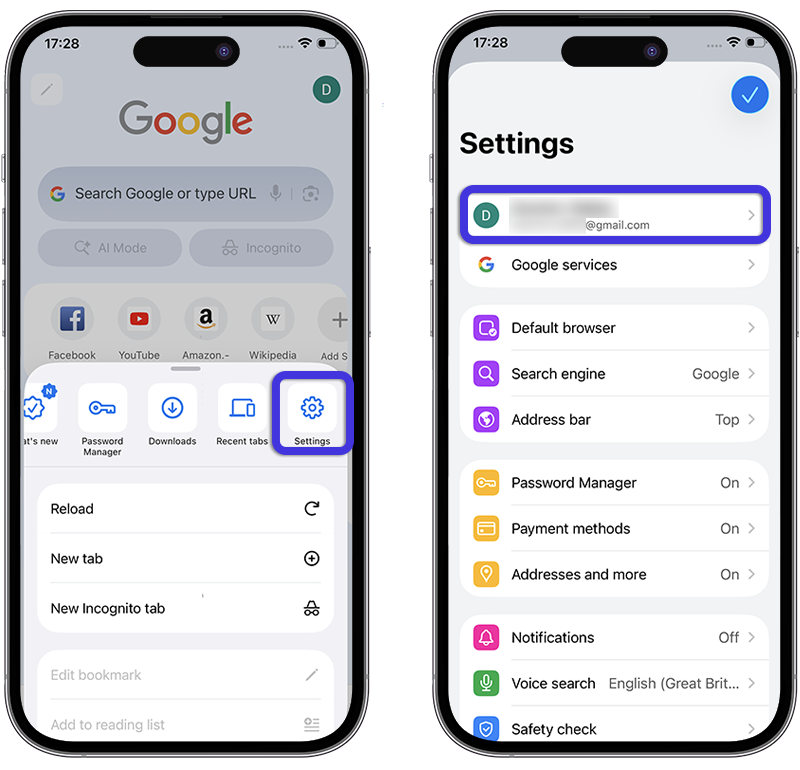
The standard synchronization feature in Google Chrome can quietly transform your browser into a surveillance tool. Furthermore, an attacker requires no malicious software or technical expertise. They merely need brief physical access to another person’s smartphone. Consequently, they can easily connect their personal Google account to the victim’s browser.
Experts at Certo Software discovered this alarming pattern after receiving numerous reports. Specifically, these appeals came from individuals experiencing digital control by abusive partners. For instance, one woman searched for a family lawyer. She also read a support website for domestic abuse victims. Shockingly, her partner detailed her exact web history two days later.
The Mechanics of Browser Hijacking
The victim exclusively used her own phone. Moreover, she noticed no newly installed applications. However, her partner had briefly borrowed her device earlier. During that time, he opened Chrome and logged in using his own Google credentials. Immediately after he activated synchronization, her browsing history began flowing directly to his profile.
The owner of this unauthorized account gains immense power. They can open Chrome on another computer and monitor the synchronized history globally. Furthermore, the stalker completely bypasses the need for the victim’s password. Additionally, Google sends the new login alert to the attacker’s account rather than the actual device owner.
Beyond Browsing History: A Broader Danger
This severe vulnerability extends far beyond a simple list of visited websites. Chrome simultaneously synchronizes bookmarks, active tabs, autocomplete data, and saved passwords. Therefore, if a victim saves a new website password, the attacker instantly acquires it. Subsequently, the stalker can attempt to compromise other personal accounts.
The Invisible Intruder
Unfortunately, Chrome displays no prominent warning about newly added profiles or active synchronization. Consequently, most users never verify which account connects to their application. According to StatCounter, Chrome held a massive 69.65% share of the global browser market in June 2026. Therefore, this straightforward exploitation technique potentially jeopardizes millions of unsuspecting individuals. Additionally, this identical method functions flawlessly on Windows and macOS computers.
Proposed Solutions and Defensive Measures
Certo urges Google to implement a temporary notification when someone connects a new account. Furthermore, the browser should constantly display the currently synchronized profile. These simple visual cues would help device owners detect unauthorized access rapidly. Crucially, these alerts would not disrupt standard browsing activities.
Users can easily verify their connected profile within the browser settings. On iPhones and iPads, the account address appears prominently at the top of the settings menu. Meanwhile, Android, Windows, and macOS users can view it by tapping the profile icon. You must immediately delete any unfamiliar accounts. Furthermore, you should change passwords for critical services immediately.
Finally, you can utilize incognito mode for highly confidential searches. This private mode ensures that visited pages evade the synchronized history log. Additionally, you should protect your physical phone with a complex passcode and biometric locks. Always verify your system settings for unauthorized fingerprints or facial recognition data. Ultimately, this scheme succeeds because a familiar browser feature enables stealthy surveillance without traditional spyware.
Support Our Threat Intelligence
If you find our technology report and cybersecurity news helpful, consider supporting our work.
 Buy Me a Coffee
PayPal
Buy Me a Coffee
PayPal


