opensnitch: GNU/Linux port of the Little Snitch application firewall
OpenSnitch
OpenSnitch is a GNU/Linux port of the Little Snitch application firewall.
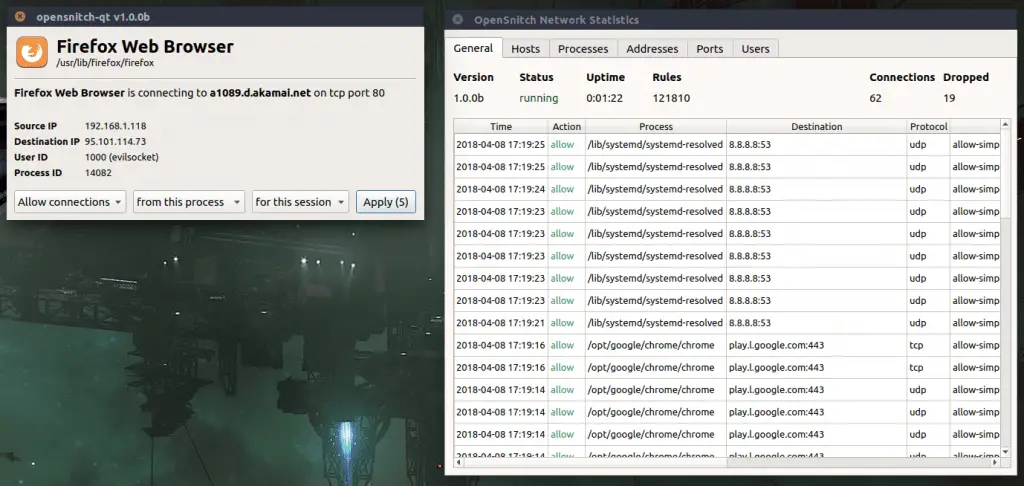
How Does It Work
OpenSnitch is an application-level firewall, meaning then while running, it will detect and alert the user for every outgoing connection applications he’s running are creating. This can be extremely effective to detect and block unwanted connections on your system that might be caused by a security breach, causing data exfiltration to be much harder for an attacker. In order to do that, OpenSnitch relies on NFQUEUE, an iptables target/extension which allows a userland software to intercept IP packets and either ALLOW or DROP them, once started it’ll install the following iptables rules:
OUTPUT -t mangle -m conntrack --ctstate NEW -j NFQUEUE --queue-num 0 --queue-bypass
This will use conntrack iptables extension to pass all newly created connection packets to NFQUEUE number 0 (the one OpenSnitch is listening on), and then:
INPUT --protocol udp --sport 53 -j NFQUEUE --queue-num 0 --queue-bypass
This will also redirect DNS queries to OpenSnitch, allowing the software to perform and IP -> hostname resolution without performing active DNS queries itself.
Once a new connection is detected, the software relies on the ftrace kernel extension in order to track which PID (therefore which process) is creating the connection.
If ftrace is not available for your kernel, OpenSnitch will fall back use the /proc filesystem, even if this method will also work, it’s vulnerable to application path manipulation, therefore it’s highly suggested to run OpenSnitch on a ftrace enabled kernel.
Installation
[pastacode lang=”markup” message=”” highlight=”” provider=”manual” manual=”%23%20install%20dependencies%0Asudo%20apt-get%20install%20protobuf-compiler%20libpcap-dev%20libnetfilter-queue-dev%20python3-pip%0Ago%20get%20github.com%2Fgolang%2Fprotobuf%2Fprotoc-gen-go%0Ago%20get%20-u%20github.com%2Fgolang%2Fdep%2Fcmd%2Fdep%0Apython3%20-m%20pip%20install%20–user%20grpcio-tools%0A%23%20clone%20the%20repository%20(ignore%20the%20message%20about%20no%20Go%20files%20being%20found)%0Ago%20get%20github.com%2Fevilsocket%2Fopensnitch%0Acd%20%24GOPATH%2Fsrc%2Fgithub.com%2Fevilsocket%2Fopensnitch%0A%23%20compile%20%26%26%20install%0Amake%0Asudo%20make%20install%0A%23%20enable%20opensnitchd%20as%20a%20systemd%20service%20and%20start%20the%20UI%0Asudo%20systemctl%20enable%20opensnitchd%0Asudo%20service%20opensnitchd%20start%0Aopensnitch-ui”/]
Run
Once you installed both the daemon and the UI, you can enable the opensnitchd service to run at boot time:
sudo systemctl enable opensnitchd
And run it with:
sudo service opensnitchd start
Single UI with many computers
You can also use –socket “[::]:50051” to have the UI use TCP instead of a Unix socket and run the daemon on another computer with -ui-socket “x.x.x.x:50051” (where x.x.x.x is the IP of the computer running the UI service).
Rules
Rules are stored as JSON files inside the -rule-path folder, in the simplest cast a rule looks like this:
[pastacode lang=”markup” message=”” highlight=”” provider=”manual” manual=”%7B%0A%20%20%20%22created%22%3A%20%222018-04-07T14%3A13%3A27.903996051%2B02%3A00%22%2C%0A%20%20%20%22updated%22%3A%20%222018-04-07T14%3A13%3A27.904060088%2B02%3A00%22%2C%0A%20%20%20%22name%22%3A%20%22deny-simple-www-google-analytics-l-google-com%22%2C%0A%20%20%20%22enabled%22%3A%20true%2C%0A%20%20%20%22action%22%3A%20%22deny%22%2C%0A%20%20%20%22duration%22%3A%20%22always%22%2C%0A%20%20%20%22operator%22%3A%20%7B%0A%20%20%20%20%20%22type%22%3A%20%22simple%22%2C%0A%20%20%20%20%20%22operand%22%3A%20%22dest.host%22%2C%0A%20%20%20%20%20%22data%22%3A%20%22www-google-analytics.l.google.com%22%0A%20%20%20%7D%0A%7D”/]
| Field | Description |
|---|---|
| created | UTC date and time of creation. |
| update | UTC date and time of the last update. |
| name | The name of the rule. |
| enabled | Use to temporarily disable and enable rules without moving their files. |
| action | Can be deny or allow. |
| duration | For rules persisting on disk, this value is default to always. |
| operator.type | Can be simple, in which case a simple == comparison will be performed, or regexp if the data field is a regular expression to match. |
| operator.operand | What element of the connection to compare, can be one of: true (will always match), process.path (the path of the executable), process.command (full command line, including path and arguments), provess.env.ENV_VAR_NAME (use the value of an environment variable of the process given its name), user.id, dest.ip, dest.host or dest.port. |
| operator. data | The data to compare the operand to, can be a regular expression if type is regexp. |
An example with a regular expression:
An example whitelisting a whole process:
Source: https://github.com/evilsocket/
Support Our Threat Intelligence
If you find our technology report and cybersecurity news helpful, consider supporting our work.
 Buy Me a Coffee
PayPal
Buy Me a Coffee
PayPal


