CloudRecon: a suite of tools for red teamers and bug hunters
CloudRecon
CloudRecon is a suite of tools for red teamers and bug hunters to find ephemeral and development assets in their campaigns and hunts.
Often, target organizations stand up cloud infrastructure that is not tied to their ASN or related to known infrastructure. Many times these assets are development sites, IT product portals, etc. Sometimes they don’t have domains at all but many still need HTTPs.
CloudRecon is a suite of tools to scan IP addresses or CIDRs (e.g.: cloud providers’ IPs) and find these hidden gems for testers, by inspecting those SSL certificates.
The tool suite has three parts in GO:
Scrape – A LIVE running tool to inspect the ranges for a keyword in SSL certs CN and SN fields in real-time.
Store – a tool to retrieve IPs certs and download all their Orgs, CNs, and SANs. So you can have your OWN cert.sh database.
Retr – a tool to parse and search through the downloaded certs for keywords.
Install
** You must have CGO enabled and may have to install gcc to run CloudRecon**
go install github.com/g0ldencybersec/CloudRecon@latest
Use
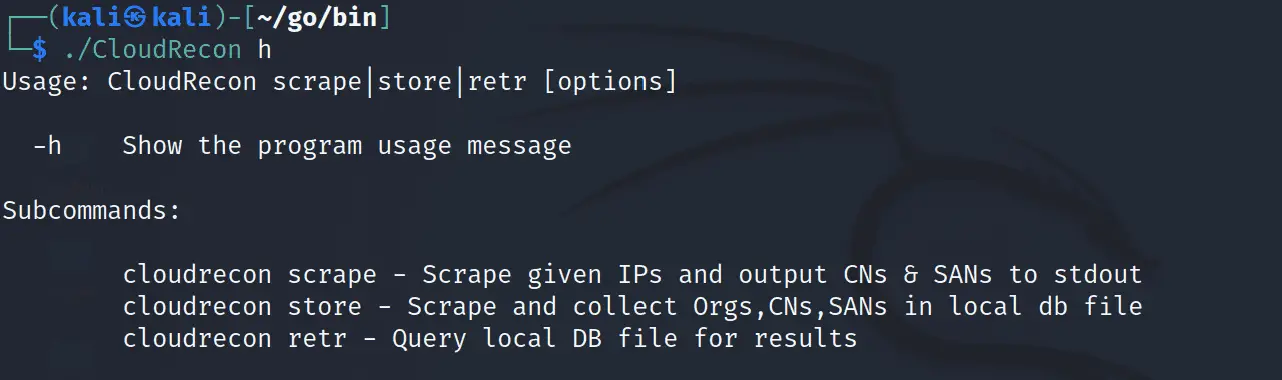
MAIN
[pastacode lang=”markup” message=”” highlight=”” provider=”manual” manual=”Usage%3A%20CloudRecon%20scrape%7Cstore%7Cretr%20%5Boptions%5D%0A%0A%20%20-h%20%20%20%20Show%20the%20program%20usage%20message%0A%0ASubcommands%3A%20%0A%0A%20%20%20%20%20%20%20%20cloudrecon%20scrape%20-%20Scrape%20given%20IPs%20and%20output%20CNs%20%26%20SANs%20to%20stdout%0A%20%20%20%20%20%20%20%20cloudrecon%20store%20-%20Scrape%20and%20collect%20Orgs%2CCNs%2CSANs%20in%20local%20db%20file%0A%20%20%20%20%20%20%20%20cloudrecon%20retr%20-%20Query%20local%20DB%20file%20for%20results”/]
SCRAPE
[pastacode lang=”markup” message=”” highlight=”” provider=”manual” manual=”scrape%20%5Boptions%5D%20-i%20%3CIPs%2FCIDRs%20or%20File%3E%0A%20%20-c%20int%0A%20%20%20%20%20%20%20%20How%20many%20goroutines%20running%20concurrently%20(default%20100)%0A%20%20-h%20%20%20%20print%20usage!%0A%20%20-i%20string%0A%20%20%20%20%20%20%20%20Either%20IPs%20%26%20CIDRs%20separated%20by%20commas%2C%20or%20a%20file%20with%20IPs%2FCIDRs%20on%20each%20line%20(default%20%22NONE%22)%0A%20%20-p%20string%0A%20%20%20%20%20%20%20%20TLS%20ports%20to%20check%20for%20certificates%20(default%20%22443%22)%0A%20%20-t%20int%0A%20%20%20%20%20%20%20%20Timeout%20for%20TLS%20handshake%20(default%204)”/]
STORE
[pastacode lang=”markup” message=”” highlight=”” provider=”manual” manual=”store%20%5Boptions%5D%20-i%20%3CIPs%2FCIDRs%20or%20File%3E%0A%20%20-c%20int%0A%20%20%20%20%20%20%20%20How%20many%20goroutines%20running%20concurrently%20(default%20100)%0A%20%20-db%20string%0A%20%20%20%20%20%20%20%20String%20of%20the%20DB%20you%20want%20to%20connect%20to%20and%20save%20certs!%20(default%20%22certificates.db%22)%0A%20%20-h%20%20%20%20print%20usage!%0A%20%20-i%20string%0A%20%20%20%20%20%20%20%20Either%20IPs%20%26%20CIDRs%20separated%20by%20commas%2C%20or%20a%20file%20with%20IPs%2FCIDRs%20on%20each%20line%20(default%20%22NONE%22)%0A%20%20-p%20string%0A%20%20%20%20%20%20%20%20TLS%20ports%20to%20check%20for%20certificates%20(default%20%22443%22)%0A%20%20-t%20int%0A%20%20%20%20%20%20%20%20Timeout%20for%20TLS%20handshake%20(default%204)”/]
RETR
[pastacode lang=”markup” message=”” highlight=”” provider=”manual” manual=”retr%20%5Boptions%5D%0A%20%20-all%0A%20%20%20%20%20%20%20%20Return%20all%20the%20rows%20in%20the%20DB%0A%20%20-cn%20string%0A%20%20%20%20%20%20%20%20String%20to%20search%20for%20in%20common%20name%20column%2C%20returns%20like-results%20(default%20%22NONE%22)%0A%20%20-db%20string%0A%20%20%20%20%20%20%20%20String%20of%20the%20DB%20you%20want%20to%20connect%20to%20and%20save%20certs!%20(default%20%22certificates.db%22)%0A%20%20-h%20%20%20%20print%20usage!%0A%20%20-ip%20string%0A%20%20%20%20%20%20%20%20String%20to%20search%20for%20in%20IP%20column%2C%20returns%20like-results%20(default%20%22NONE%22)%0A%20%20-num%0A%20%20%20%20%20%20%20%20Return%20the%20Number%20of%20rows%20(results)%20in%20the%20DB%20(By%20IP)%0A%20%20-org%20string%0A%20%20%20%20%20%20%20%20String%20to%20search%20for%20in%20Organization%20column%2C%20returns%20like-results%20(default%20%22NONE%22)%0A%20%20-san%20string%0A%20%20%20%20%20%20%20%20String%20to%20search%20for%20in%20common%20name%20column%2C%20returns%20like-results%20(default%20%22NONE%22)”/]
Copyright (c) 2023 g0lden
Source: https://github.com/g0ldencybersec/
Support Our Threat Intelligence
If you find our technology report and cybersecurity news helpful, consider supporting our work.
 Buy Me a Coffee
PayPal
Buy Me a Coffee
PayPal