BFScan: Uncover Hidden URLs, Paths, & Secrets in JAR/WAR/APK Files
BFScan – Tool for initial processing of APK / XAPK / DEX / JAR / WAR applications.
- Search for strings in source code and resources that look like URIs, paths, or secrets
- Generate raw HTTP requests and OpenAPI specifications based on config files, class and method annotations
- Supported client libraries
- Supported server libraries
Use
[pastacode lang=”bash” manual=”java%20-jar%20bfscan.jar%20%3Cjar_war_apk%3E%20%3C…%3E%20%5B-m%20%3Cmode%3E%5D%20%5B-ma%20%3CminifiedAnnotationsSupport%3E%5D%20%5B-r%20%3CmappingFile%3E%5D%20%5B-s%20%3CsearchString%3E%5D%20%5B-u%20%3Curl%3E%5D%20%5B-v%20%3Cverbose%3E%5D%0A%0A%20-m%20%3Cmode%3E%20%20%20%20%20%20%20%20%20%20%20%20%20%20%20%20%20%20%20%20%20%20%20%20%20%20Mode%20(%5Ba%5Dll%2C%20%5Bs%5Decrets%2C%20%5Bh%5Dttp)%2C%20default%3A%20all%0A%20-ma%20%3CminifiedAnnotationsSupport%3E%20%20%20Minified%20or%20unknown%20annotations%20support%20(yes%2C%20no)%2C%20default%3A%20yes%0A%20-r%20%3CmappingFile%3E%20%20%20%20%20%20%20%20%20%20%20%20%20%20%20%20%20%20%20Deobfuscation%20mapping%20file%0A%20-s%20%3CsearchString%3E%20%20%20%20%20%20%20%20%20%20%20%20%20%20%20%20%20%20Search%20string%0A%20-u%20%3Curl%3E%20%20%20%20%20%20%20%20%20%20%20%20%20%20%20%20%20%20%20%20%20%20%20%20%20%20%20API%20base%20url%20(http%3A%2F%2Flocalhost%2Fapi%2F)%0A%20-v%20%3Cverbose%3E%20%20%20%20%20%20%20%20%20%20%20%20%20%20%20%20%20%20%20%20%20%20%20Log%20level%20(off%2C%20error%2C%20warn%2C%20info%2C%20debug%2C%20trace)” message=”” highlight=”” provider=”manual”/]
[pastacode lang=”bash” manual=”java%20-jar%20bfscan.jar%20test%2F*.apk%20-u%20https%3A%2F%2Fexample.tld%2Fapi%2F” message=”” highlight=”” provider=”manual”/]
Example
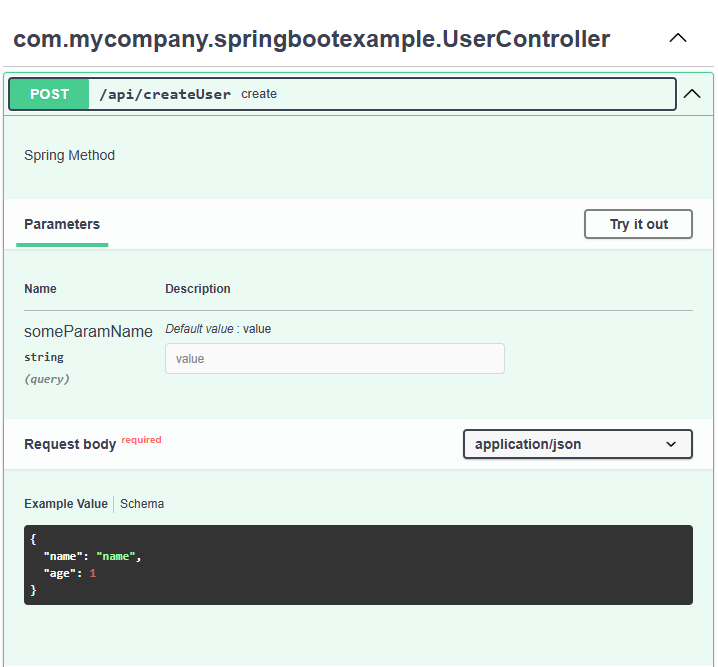
For this class using Spring annotations, the following results will be generated.
[pastacode lang=”java” manual=”%40RestController%0A%40RequestMapping(%22%2Fapi%22)%0Apublic%20class%20UserController%20%7B%0A%0A%20%20%20%20%40PostMapping(%22createUser%22)%0A%20%20%20%20public%20String%20create(%40RequestParam%20Optional%3CString%3E%20someParamName%2C%20%40RequestBody%20User%20user)%20%7B%0A%20%20%20%20%20%20%20%20return%20%22response%22%3B%0A%20%20%20%20%7D” message=”” highlight=”” provider=”manual”/]
Results
Method: com.mycompany.springbootexample.UserController->create
- Spring Method[pastacode lang=”java” manual=”POST%20%2Fapi%2FcreateUser%3FsomeParamName%3Dvalue%20HTTP%2F1.1%0AHost%3A%20localhost%0AConnection%3A%20close%0AContent-Type%3A%20application%2Fjson%0A%0A%7B%0A%20%20%22name%22%3A%20%22name%22%2C%0A%20%20%22age%22%3A%201%0A%7D” message=”” highlight=”” provider=”manual”/]
Obfuscated code
If you are analyzing an application that uses a supported library, but its code is obfuscated, you can create a mapping file to replace the class names.
To do this, you can manually use the “Rename” function in the decompiled code in the jadx-gui, and then save the generated mapping file (File > Save mappings). Or use an example mapping file for Retrofit and modify it according to your application.
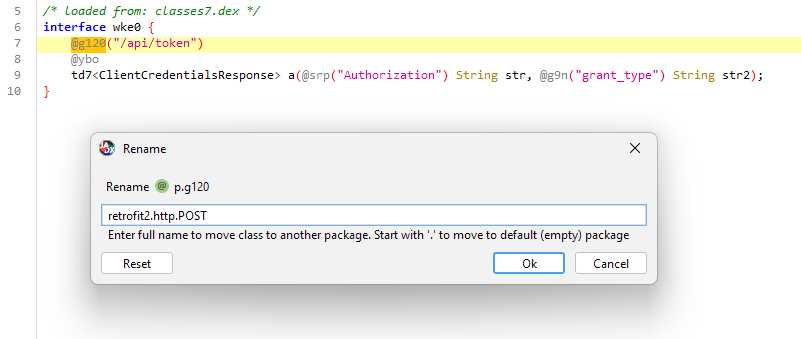
Example of analyzing an application with renaming classes using a mapping file.
[pastacode lang=”bash” manual=”java%20-jar%20BFScan.jar%20.%2Ftests%2Fexample.apk%20-r%20.%2Ftests%2Fmapping.txt” message=”” highlight=”” provider=”manual”/]
Download
Support Our Threat Intelligence
If you find our technology report and cybersecurity news helpful, consider supporting our work.
 Buy Me a Coffee
PayPal
Buy Me a Coffee
PayPal


