Tag: Windows 10 October Update

  • Leak: Windows 10 October Update will be re-launched tomorrow

    Microsoft urgently withdrew the first Windows 10 October Update (1809) because of a serious data loss bug. For a long time after that, the company did not give a timetable for re-launch. However, according to the latest news from rg-adguard.net, the “2018 October Update” is expected to be re-launched on November 13th (Patch Tuesday)The site has a Windows 10 ISO download tool, so keep an eye on the latest developments on the Microsoft download server.

    From the latest developments, Microsoft should be ready to re-release. @rgadruard wrote in the tweet:

    The preparations for the 13th of November (Tue) are under way Another attempt to introduce the build version of 1809 in the world It is possible that until November 13 this file” mediacreationtool1809oct. exe “will be replaced by the newer …”

    I hope that the Windows 10 “October Update” after the re-launch will not repeat the same mistakes.

    Via: mspoweruser
  • Microsoft confirms that Windows 10 October Update have a sound card driver error

    After the Windows 10 update in October, the problem of the disappearance of audio drivers surfaced on the Internet yesterday. Microsoft has taken the initiative to acknowledge these reports today. First of all, Windows 10 Cumulative Update is not technically the culprit of the audio problems you may encounter. The problem mainly occurred earlier this week when Microsoft incorrectly launched a bad Intel driver through Windows Update.

    After installing the update, the user received an error described as “no audio output device installed” on the Windows 10 October 2018 Update and April 2018 Update devices.

    Microsoft said that all of this has indeed happened because a bad driver was accidentally offered to individual devices via Windows Update. Fortunately, there is a simple solution, because all you need to do is write to this driver and the audio will be restored.

    “After receiving reports from users that their audio no longer works, we immediately removed it and started investigating.  If your audio broke recently, and you’re running Windows 10 version 1803 or above, please check to see if the incorrect driver was installed. To regain audio, we recommend you uninstall the driver,” Microsoft explained in a blog post.

    1. Type Device Manager in the search box
    2. Find and expand Sound, video, and game controllers
    3. Look for a Realtek device, or a device that has a yellow triangle with an exclamation point
    4. Click on the device to select it
    5. From the View menu, choose Devices by connection
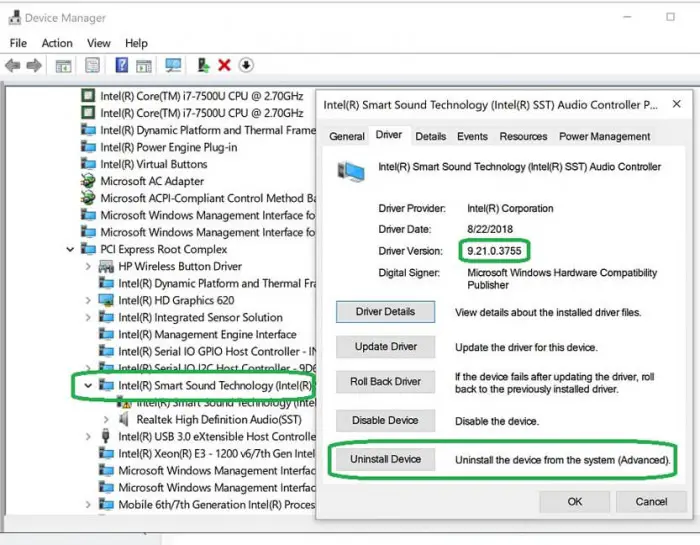
    6. Look at the parent device – this will be called something like “Intel SST Audio Controller” (Intel Smart Sound Technology driver version 09.21.00.3755)
    7. Right-click the controller device
    8. Choose Properties
    9. You should get a dialog like below. Click on the Driver tab as shown.
    10. If the driver version is 9.21.0.3755, you have the driver that was sent to you incorrectly.
    11. Click Uninstall Device. You will get a popup asking if you want to remove the driver too, as shown.
    12. Check the checkbox as shown, so the driver will be removed.
    13. Click Uninstall.
    14. When the driver is uninstalled, reboot your system.
    15. Your audio (speakers and headphones) should now work.


  • Microsoft relaunched Windows 10 October Update after fixing a loose file error

    Microsoft today re-released the Windows 10 October 10 Update for Insiders. After Microsoft publishes Windows 10 October Update, users complained about data loss after the computer update, and Microsoft urgently withdrew this update. John Cable, director of Windows service and delivery project management at Microsoft, said, “We have fully investigated all reports of data loss, identified and fixed all known issues in the update, and conducted internal validation.”

    Microsoft is now re-released the Windows 10 October 10 Update 2018, which will be rolled out for a wider range of users. Cable explained, “We will carefully study the results, feedback, and diagnostic data from our Insiders before taking additional steps towards re-releasing more broadly.”

    The update failure seems to be related to the folder redirection feature. Windows 10 users whose files were accidentally deleted have previously enabled this feature to redirect folders such as desktops, documents, images, and screenshots in the default location. Microsoft introduced code in the October update to remove known empty folders and duplicate folders. Microsoft has developed fixes to address various issues related to the movement of these folders, which are now being tested by internal staff.

    In fact, Microsoft’s testing community has flagged some of these issues before the October update. Microsoft seems to admit this because it is making some changes to the Windows 10 feedback tool to ensure that testers can flag the severity of the fault report. “We have added an ability for users to also provide an indication of impact and severity when filing User Initiated Feedback,” Cable explained. “We expect this will allow us to better monitor the most impactful issues even when feedback volume is low.”

    Microsoft will monitor the feedback related to the re-release of the October update, and once it is convinced that “no further impact on Windows 10 users”, Microsoft will officially release this version of the update to users.

    Via: Windows

  • The printer drivers move to Windows Update on Windows 10 October Update

    Starting with Windows 10 version 1809, printer and scanner drivers are no longer part of the standard operating system imageThis means that drivers for such hardware need to be installed from Windows Update, so an Internet connection is required to download the latest software. In a recent statement, Microsoft explained that the change was specifically made to make the Windows image lighter.

    “Starting with Windows 10, version 1809, inbox print and scan drivers have moved to Windows Update. Prior versions of Windows included basic printer drivers that enabled simple printing when a full feature driver was not available. To reduce the Windows footprint and provide more storage space to users, these drivers no longer ship with the OS and instead are available through Windows Update.”

    Although this method may cause problems in some cases, Microsoft said it would handle the update strategy of the printer and scanner drivers to make the implementation of the new system as smooth as possible.

    Users who have upgraded from the old Windows 10 to the October 2018 update will not notice any differences because the hardware drivers are already installed.

    If you can’t access Windows Update, for example, if there is no Internet connection, Microsoft says Windows 10 will install a Mopria-compatible printer without the need for additional drivers.

    “Starting with Windows 10, version 1809, Windows has added support for Mopria-compatible Wi-Fi printers. When a driver is not available, Windows can install these printers without you needing to install any additional software or drivers.”

    Via: Microsoft

  • Will Microsoft release Windows 10 October Update on October 2?

    Previous reports have said that Build 17763 will be the final version of Windows 10 October 2018 (Version 1810), but the current Microsoft official has not confirmed, just saying that “the disappearance of the watermark does not mean that it has been completed.” According to Windows Lastest reported today, there is new evidence that Build 17763 is the RTM version of Windows 10 October update.

    According to the screenshot shared by the user abbodi1406 in the MyDigitalLife forum, the product XML page included in the ESD indicates that the Windows 10 October update will be released on October 2 this year, which means that it is not a few days away from the official release.

    At present, Build 17763 is still in the Slow Ring, and the media believe that Microsoft will not release it on October 2. Because it moves from the Slow channel to the Release Preview channel and then accepts additional patches (if necessary), the entire process takes at least a week. Microsoft has confirmed that the hardware conference will be held on October 2nd, and perhaps the content of the Windows 10 feature update will be announced at this conference.